
Showing posts with label commands. Show all posts
Showing posts with label commands. Show all posts
Saturday, 3 February 2007

Saturday, 20 January 2007
Command: "alias"
You can create your own commands by using the "alias" command.
For example, you want to launch a TV recording program remotely. Firt add a new command:

(/action: [a]dd, [r]emove or [l]ist aliases. Here we're adding a new alias, named "tv")
Now you have you own "tv" command!
You can also specify arguments to the program launched:

Now, by typing "ie", Internet Explorer will be launched with google as its start page.
You can list and remove aliases:
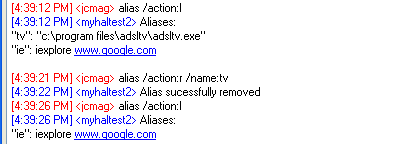
For example, you want to launch a TV recording program remotely. Firt add a new command:

(/action: [a]dd, [r]emove or [l]ist aliases. Here we're adding a new alias, named "tv")
Now you have you own "tv" command!
You can also specify arguments to the program launched:

Now, by typing "ie", Internet Explorer will be launched with google as its start page.
You can list and remove aliases:


Wednesday, 17 January 2007
Command: "ps"
The "ps" command displays running processes:

/p displays the PID, /r displays the priority, /sort is used to sort by name, pid or priority.
(to display the help, type: "ps /?" or "ps /help")

/p displays the PID, /r displays the priority, /sort is used to sort by name, pid or priority.
(to display the help, type: "ps /?" or "ps /help")
File system commands
You can navigate your remote computer's file system by using the "pwd" (print working directory), "cd" (change directory) and "ls" (list directory contents) commands (like in a shell).
For example:
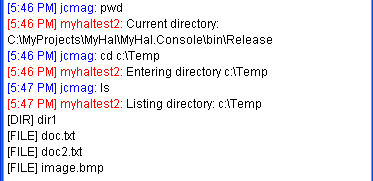
You can even upload files (using your Jabber client "send file" function):
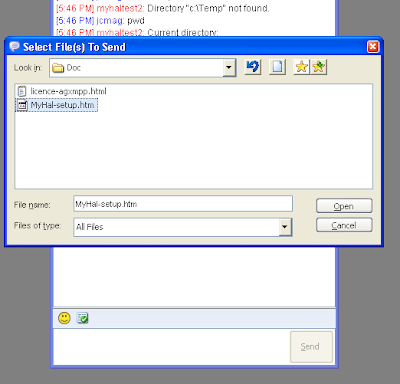
The file is uploaded in the current directory:

You can also download files using the "file" command:
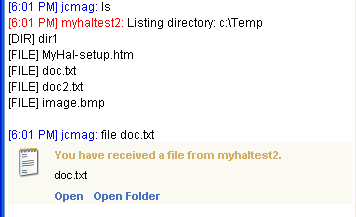
(you have to open port 15000 in your firewall )
For example:

You can even upload files (using your Jabber client "send file" function):

The file is uploaded in the current directory:

You can also download files using the "file" command:

(you have to open port 15000 in your firewall )
Saturday, 13 January 2007
Command: "ip"
By typing "ip" I will display your IP address(es):
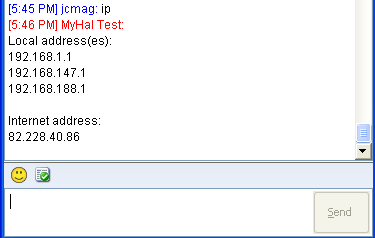
Here you can see that the computer has three local addresses (three network cards), and one Internet address (this is the address other people see on the Internet).
You can type "ip /l" to display only local addresses (it's a little faster because an http request is done to retrieve the Internet address).
You can type "ip /full" to display a more complete view.
(and you can type "ip /?" or "ip /help" to display the help)

Here you can see that the computer has three local addresses (three network cards), and one Internet address (this is the address other people see on the Internet).
You can type "ip /l" to display only local addresses (it's a little faster because an http request is done to retrieve the Internet address).
You can type "ip /full" to display a more complete view.
(and you can type "ip /?" or "ip /help" to display the help)
Command: "alarm"
I can send you a message after some hours/minutes/seconds (useful to don't forget the egg in the boiling water after 3 minutes...)

(to display the help, type: "alarm /?" or "alarm /help")

(to display the help, type: "alarm /?" or "alarm /help")
Command: "sysinfo"
By typing "sysinfo" I will display some system information about the computer on which I'm running:


Subscribe to:
Posts (Atom)